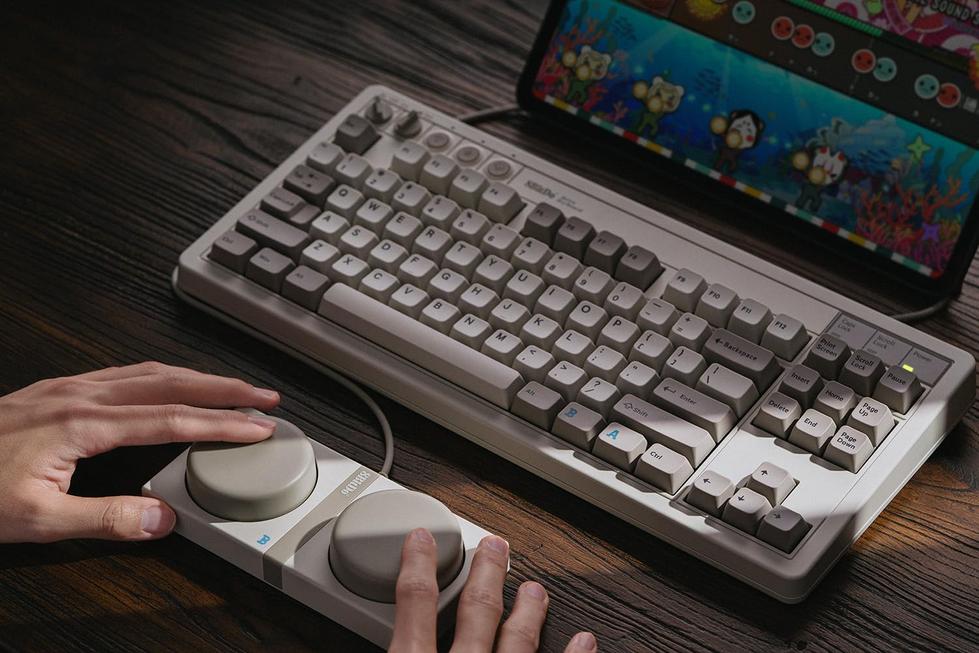
When the 8BitDo Retro Mechanical Keyboard arrived on my desk, its clack and height felt at odds with the low-profile Magic Keyboard habit I’d long forgotten. It was less about nostalgia and more about how a new form factor forced small adaptations: the MacBook lifted and angled differently, a thicker cable snaking toward the back edge, and an acute awareness of battery level when using Bluetooth.
The desk configuration shifted almost imperceptibly. I nudged a notepad aside to make room for the sturdy case, coaxing the MacBook off center so the keyboard cable would drape naturally. My favorite pair of AirPods moved into a new nook to avoid tangling. The physical act of snapping the keyboard’s USB-C connector into place—deeper and firmer—became a punctuation mark at the start of each session.
Late at night, I’d open a document on the MacBook and pause, hand hovering over the keyboard’s status LED. In the darkness, the red glow would fade by the time I slid onto my chair. I never noticed how often I reached for my iPhone’s nightstand charger until the keyboard joined the rotation. That brief grasp of a USB-C cable in low light underscored how a single accessory can expand a habitual charging circuit.
A weekend away revealed another layer. Packing the keyboard alongside my MacBook meant shifting a paperback and sliding the cable into a hidden compartment of my backpack. In the pick-up line at airport security, I hesitated as I unzipped the main pouch: a flicker of thought about lifting the slim MacBook before the keyboard came second. It was a fleeting moment, but one that exposed how journey routines silently reorder priorities.
Switching the keyboard between MacBook and iPad introduced its own friction. A double-tap to toggle from a Mac workspace to sketching on an iPad felt polite yet deliberate. Halfway through a note-taking session, the keyboard would pause to blink its battery warning, prompting a short break to reconnect the USB-C cable. Those pauses, small as they were, became embedded in my flow.
By midday, glancing at Bluetooth settings for the keyboard felt as routine as checking an Apple Watch for activity rings. The act of plugging in to recharge was not a chore but a moment to realign. Sometimes I lingered over the clack of keys, aware that each press was anchored by a hidden effort to keep the battery between 30 and 80 percent.
In the wider Apple ecosystem, this retro keyboard sits alongside wireless mice, iPhone docks and AirPods mats. Recent listings reflect a 20% reduction compared with earlier availability. Yet the more telling adjustment lies in the subtle choreography of cables, ports and morning stretches—habits forming around an object that was never meant to be central.
Affiliate Block
This product has recently appeared more often in conversations around portable Apple setups and everyday charging routines.
Check current availability here
FAQs
Is the 8BitDo keyboard compatible with MacBook macOS shortcuts?
The keyboard supports standard macOS input and allows remapping of certain keys through its onboard firmware, without additional drivers.
How does USB-C charging integrate with other Apple accessories?
Using a shared USB-C outlet or hub, you can recharge the keyboard alongside MacBook, iPad or power banks without altering existing cable arrangements.
Can the keyboard maintain a Bluetooth connection to an iPad and Mac simultaneously?
It pairs with up to three devices and toggles between them via a quick hot-key command, though only one connection is active at a time.
Does frequent wireless use impact the keyboard’s battery life?
Battery level tends to drop incrementally with heavy Bluetooth use; periodic USB-C top-ups help keep it within an optimal range for sustained typing routines.
Verdict
Integrating the 8BitDo Retro Mechanical Keyboard into a MacBook-centric workflow reveals how an accessory can redirect minute behaviors—from cable choreography to device prioritization in travel. The tactile experience reconfigures both desk posture and charging pauses, illustrating how each click and connector shapes a day. Observing these incremental adaptations underscores the quiet way our routines absorb new elements, letting a single object quietly map out the contours of productivity.
"Note: Readers like you help support The Apple Tech. We may receive a affiliate commission when you purchase products mentioned on our website."