
In a sunlit corner of a home office, an iPhone rests against the hinge of a MacBook, angled just enough to catch a colleague’s face during a silent video call. The laptop screen glows with open tabs, and nearby, a braided cable snakes across the desk toward a low-power USB port. The phone’s own stand has been coaxed into place, a silent concession to the recurring wobble that comes when fingers brush the glass during scrolling.
Across that same wood-grain surface, an Apple Watch lies beside a Qi charging puck. Earbud cases perch on a coaster, and the MacBook’s trackpad bears a thumbprint smudge. Tension is low, but the phone’s precarious balance remains a subtle friction—one that nudges many to seek a steadier posture. It’s not a matter of novelty, but of quietly reshaping how devices share a workspace.
Late at night, there’s another familiar motion. A hand reaches out in the dark, searching first for the Lightning cable before pausing to find the phone itself. With practised certainty, the device is flipped upright, its base resting on a nightstand’s edge so notifications appear at a glance. In that half-wake state, fiddling with a hinge or rolling a stand into place is simply part of an unwritten charging ritual.
During commutes, the ritual shifts. A phone nestled beside AirPods and an iPad slides from a backpack into a commuter’s palm. The gentle click of a ring stand opening can be felt more than heard, a tactile reminder that this device will need to stand on its own when the next call comes through. Any reliance on external props—coffee cups or handrails—introduces a small gamble in stability.
On café tables, the interplay continues. An iPhone leans at a slight angle, its voice memo app recording a passing thought. The MacBook folds back to reveal its keys, and the phone’s stand keeps it upright, its shadow slicing across a latte’s surface. Observed from above, this arrangement suggests a fleeting likeness to a desktop publishing studio, though it’s merely a momentary alignment of routines.
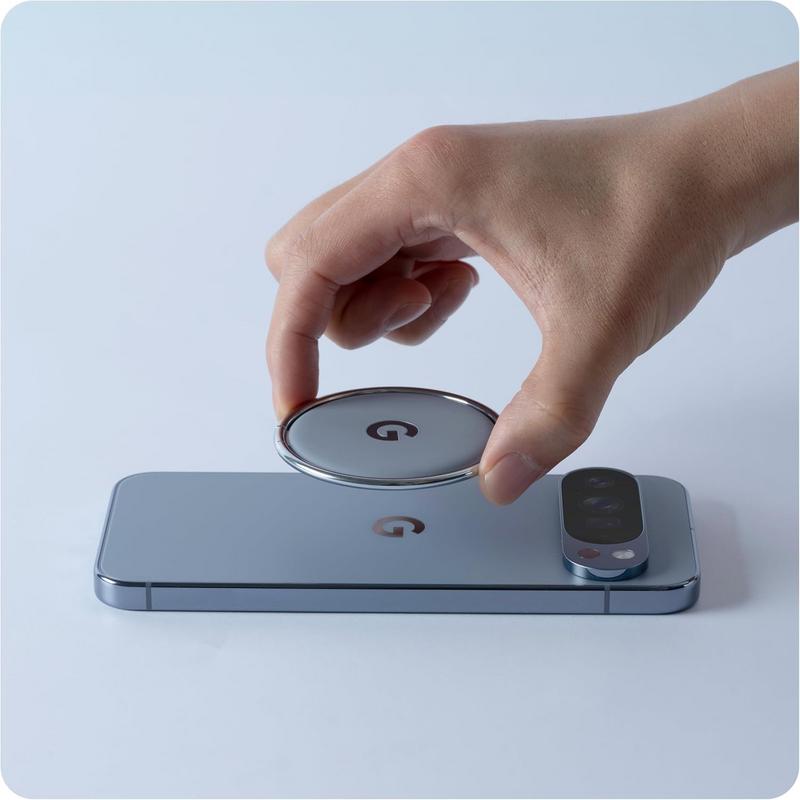
Amid these subtle choreographies, a new object has settled into view: a ring-based stand designed for a competing handset. Its polished metal ring snaps open with a precise motion, folding flat onto a phone’s back when not in use. Though crafted for another ecosystem, its presence underscores how invisible objects can steer our workflows—quiet agents in the background of our device habits.
Recent listings reflect reductions of nearly 30 percent compared with earlier availability.
This product is available on Amazon.
Check current availability here
Can the ring stand interfere with MagSafe charging on an iPhone?
The metal ring stand sits flush against the phone’s back and can interrupt magnetic alignment on MagSafe-compatible chargers, requiring the stand to be folded flat or removed for direct contact.
Does the ring stand affect cable charging or USB-C port access?
The stand attaches centrally and does not obstruct the USB-C or Lightning port, allowing users to fold it away while maintaining a charged connection without full removal.
How does a ring stand change everyday device workflows on a desk?
It offers a slight tilt for quick glances during calls or notification checks, reducing the need to hold the phone. Over time, it becomes a regular fixture that guides how devices are positioned and interacted with.
Does the ring stand affect device temperature or battery performance?
The metal backing can conduct heat away from the phone, but during extended use—such as prolonged calls or streaming—any impact on battery discharge or device temperature remains minimal.
Verdict
Leaning a phone against a laptop or propping it on a nightstand may seem incidental, yet these small gestures reveal a broader need for stability in our device interactions. The rise of companion accessories speaks to how we adapt workflows around imperceptible frictions—seeking ways to keep calls clear, notifications visible, and hands free. In this quiet recalibration, we acknowledge that the habits shaping our days often center on the margins of convenience rather than grand innovations.
"Note: Readers like you help support The Apple Tech. We may receive a affiliate commission when you purchase products mentioned on our website."