

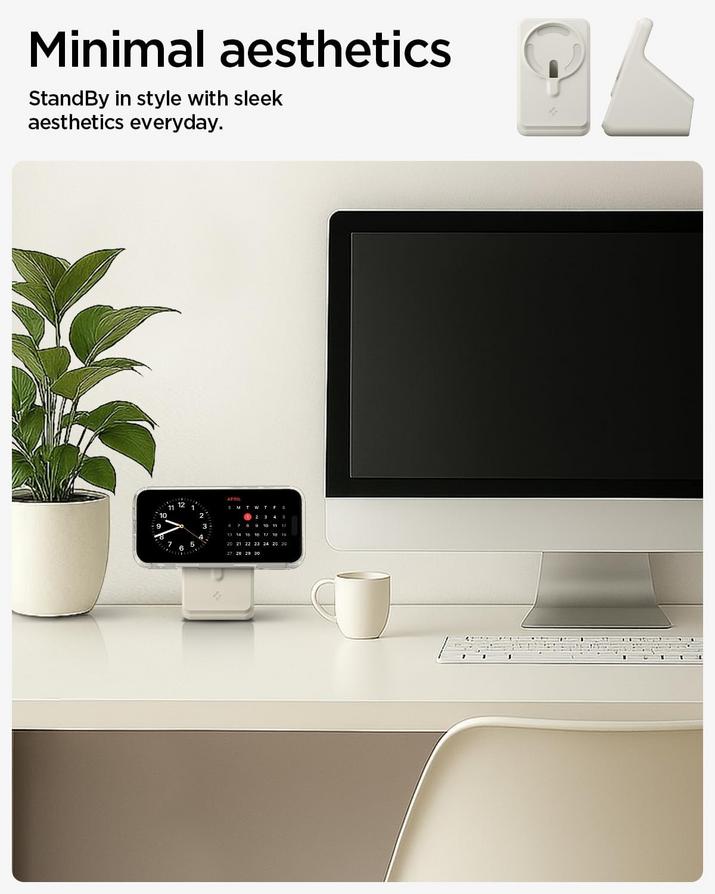
The everyday habit of docking an iPhone for power has subtly evolved for many, revealing a quiet reshaping of bedside tables and workspace surfaces.
For years, the ritual was straightforward: plug in the Lightning cable, or later, place the device flat on a wireless charging pad. With the advent of MagSafe, a new magnetic choreography emerged. The satisfying snap as an iPhone aligned with its charging disc marked a shift, yet the device often remained prone, a sleek rectangle resting passively on a surface. This flat posture, while functional, introduced its own quiet friction into the daily rhythm.
Consider the subtle inconveniences that accumulate: the device lies flat, making glancing at notifications across a room less immediate. Responding to a FaceTime call requires picking up the phone entirely, breaking the charging connection, or propping it precariously against a book or a coffee mug. These are not grand frustrations, but rather a recurring, low-grade background hum of inefficiency that many Apple users quietly tolerate, adjusting their posture or the device’s position multiple times a day.
Over time, this minor friction often leads to a natural, almost subconscious behavioral adaptation. Users begin to seek elevation, a more natural viewing angle that aligns with how they interact with the screen throughout the day. This might manifest as stacking books to create a makeshift stand, or leaning the iPhone against a monitor — small, organic adjustments born from the desire for easier access and improved visibility of a perpetually connected device. The simple act of placing a device on a magnetic disc, now elevated, becomes a quiet punctuation mark at the end of a long day.
One particularly mundane moment illuminates this shift: the fumbling for a charging cable in the dark of a nightstand. Or, worse, the accidental nudge that sends a precariously propped iPhone sliding off its charging disc. The small, often overlooked physical interactions with our devices at the start and end of each day are where these minor frustrations coalesce into a quiet desire for something more deliberate, a dedicated anchor point for the device.
This is where the quiet dependency patterns begin to emerge. A specific, dedicated stand that integrates the MagSafe puck isn’t merely about charging; it’s about refining the interaction. It subtly orchestrates how an iPhone sits within a personal space, transforming it from a prone slab into a glanceable display, always ready. The act of “docking” replaces “plugging in,” becoming an almost unconscious gesture that signals the device is home, charging, and ready for passive interaction.
The shift isn’t about revolutionary technology, but rather about addressing human habits within the Apple ecosystem. It’s an acknowledgment that while MagSafe offered magnetic convenience, the physical orientation of the device remained a variable. Integrating that charging disc into a stable, angled stand normalizes a posture many users had implicitly desired, often without fully articulating it. This evolution speaks to a broader trend of users subtly customizing their digital-physical interfaces to better suit their personal workflows and living spaces.
Many Apple users have found that a simple, dedicated charging stand can quietly resolve these small, everyday frictions. These solutions offer a stable, elevated perch, transforming the passive act of charging into an opportunity for glanceable information and more natural interaction. Listings for such accessories currently reflect reductions of roughly 10 percent compared with earlier availability, making these subtle workflow enhancements more accessible.
This product is currently available on Amazon and has been drawing attention among Apple users interested in cleaner and more adaptable everyday setups.
Check availability and latest pricing here
Is this stand compatible with older iPhone models that don’t have MagSafe?
This type of stand is specifically designed to integrate with Apple’s MagSafe charging technology, which was introduced with the iPhone 12 series. While older iPhones can still charge wirelessly, they won’t magnetically adhere to the MagSafe puck within the stand.
How does a MagSafe stand improve the charging experience compared to just using a MagSafe charger flat on a desk?
A MagSafe stand elevates the iPhone to a more visible and ergonomic angle, facilitating passive interactions like checking notifications or using StandBy mode without needing to pick up the device. It also often aids in cable management, reducing desk clutter.
Can I use any USB-C power adapter with a MagSafe charger integrated into one of these stands?
Yes, any standard USB-C power adapter can be used, although for optimal charging speeds, particularly for 15W MagSafe charging, a 20W or higher USB-C power adapter is recommended by Apple.
Does using a silicone stand affect the heat dissipation of the MagSafe charger or iPhone during charging?
Well-designed silicone stands typically allow for adequate heat dissipation around the MagSafe charger and the iPhone. Silicone itself is not a significant thermal conductor, and proper cutouts or open designs ensure airflow to prevent excessive heat buildup.
Verdict
The gradual adoption of dedicated MagSafe charging stands highlights a pervasive theme in the Apple ecosystem: the quiet human impulse to refine daily interactions with technology. It’s less about the novelty of charging and more about the subtle optimization of device posture, easing low-grade friction, and normalizing a more convenient visual access to an iPhone. Users are not simply charging; they are subtly recalibrating their spatial relationship with their most personal device, reflecting an evolving expectation of seamless integration into their living and working spaces.
"Note: Readers like you help support The Apple Tech. We may receive a affiliate commission when you purchase products mentioned on our website."






