

The Apple desktop, for many, is a carefully curated space, a nexus where digital and physical worlds meet with intentional design. Yet, upon closer inspection, a distinct pattern emerges: nestled beside the familiar keyboard, often an external pointing device from another manufacturer finds its place. This isn’t a rejection of Apple’s own elegant solutions, but rather an intriguing testament to how deeply individual comfort and specific workflow demands shape personal technology habits. It speaks to a quiet acknowledgment that the perfect solution for one task or hand might reside outside the native ecosystem.
For all the sleek precision of Apple’s trackpads and mice, their minimalist forms do not universally cater to every user’s ergonomic preference or the relentless demands of certain digital professions. A subtle friction often accompanies prolonged use, a low-grade physical insistence that nudges some users towards alternatives. This isn’t a dramatic break, but a gradual, almost unconscious migration—a search for a contour that better fits the hand, a scroll wheel that offers a different tactile feedback, or buttons that provide additional programmable functions for specific applications. It’s a quiet negotiation between aesthetic integration and practical utility.
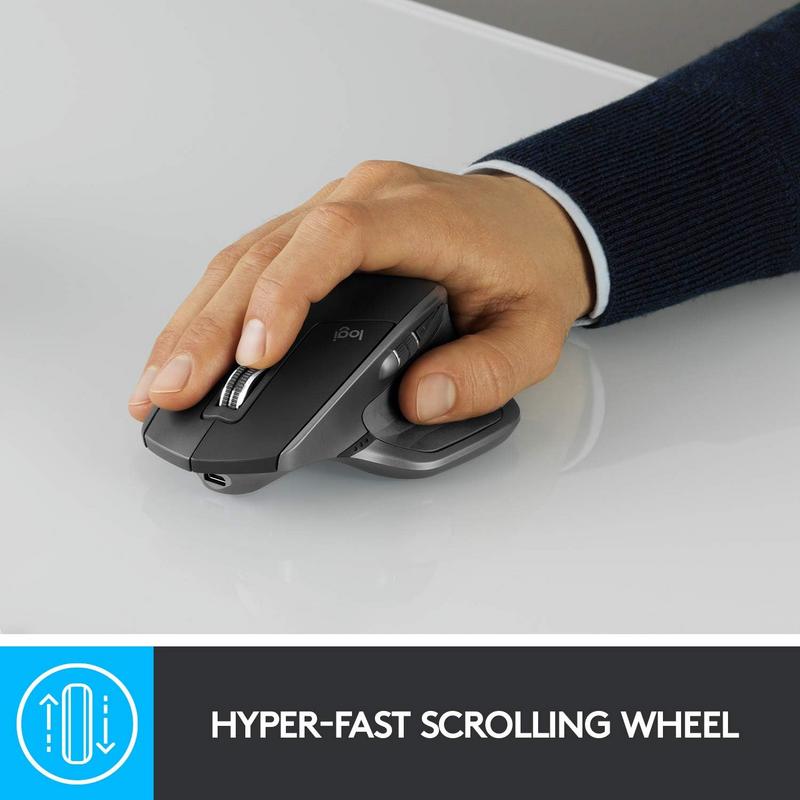
Over time, this behavioral adaptation solidifies into routine. The act of reaching for an external mouse becomes an automatic gesture, as ingrained as opening a favorite application. Users begin to appreciate the nuanced control offered by features like hyper-fast scrolling for long documents or expansive spreadsheets, finding it subtly alters their rhythm of interaction. This choice isn’t about discarding Apple’s philosophy, but about augmenting it, weaving a third-party peripheral into the fabric of a macOS-centric workflow until its presence feels entirely natural, almost expected.
Consider the mundane moment of a late afternoon, the desk light catching the graphite curve of an external mouse. The hand settles onto its familiar form, the thumb resting naturally in its groove. There’s a subtle weight, a reassuring solidity that contrasts with lighter, more minimalist alternatives. Perhaps it’s the quiet click of its buttons or the distinct whir of its scroll wheel, a different auditory signature than the gentle tap of a trackpad. Later, as the workday winds down, the routine might involve plugging in a single USB-C cable, ensuring it’s charged for the following day, a small, predictable ritual that keeps the peripheral ready without demanding constant attention.
The quiet dependency extends beyond mere comfort. Many Apple users operate across multiple platforms, toggling between a Mac for creative work and a PC for other tasks. An external mouse that seamlessly transitions between these environments via Bluetooth becomes an essential bridge, simplifying the physical workspace by reducing peripheral clutter. This multi-device capability fosters an invisible workflow efficiency, allowing a single pointing device to manage disparate digital landscapes without a second thought. The absence of a tangle of cables, replaced by the simplicity of wireless connectivity, often goes unnoticed precisely because it functions as intended, fading into the background of daily operations.
This integration reflects a deeper insight into how people truly work: not in hermetically sealed ecosystems, but in fluid, often mixed-technology environments. The choice of an external mouse, while seemingly minor, represents a significant behavioral shift towards customizing the interaction layer. It highlights how Apple users, while appreciating the cohesive design of their primary devices, are also pragmatic navigators, willing to introduce a non-native element if it serves a specific need or alleviates a persistent ergonomic concern. The story isn’t about the product itself, but how its qualities allow individuals to quietly optimize their personal digital interface, reducing low-grade friction and deepening their comfort with the tools at hand.
In these observations, the external mouse, far from being an outlier, becomes another quietly absorbed component in the diverse, evolving landscape of Apple-centric computing. It underscores the ongoing adaptation within professional and personal workspaces, where practical considerations often shape the subtle contours of daily habits. Listings currently reflect reductions of roughly 25 percent compared with earlier availability, making these adaptive choices even more accessible for those exploring alternatives.
This product is currently available on Amazon and has been drawing attention among Apple users interested in cleaner and more adaptable everyday setups.
Check availability and latest pricing here
How does an external Bluetooth mouse integrate with macOS and Apple devices?
External Bluetooth mice typically connect to macOS devices like a Mac, MacBook, or iPad Pro through the system’s Bluetooth settings, appearing as a standard input device. macOS provides settings for pointer speed and scrolling behavior, allowing users to customize the experience to their preference, often integrating smoothly into existing Apple ecosystem workflows.
What are the typical charging habits and portability considerations for such a device?
Many advanced external mice are rechargeable via a USB-C cable, mirroring the charging convenience of modern Apple devices. Users often integrate charging into their overnight routines or during breaks, much like they would an iPhone or iPad. For portability, the wireless design and robust construction allow for easy inclusion in a backpack or briefcases alongside other Apple gear without cable clutter.
Can a non-Apple mouse still support cross-device workflows within the Apple ecosystem?
Yes, many external mice are designed to connect to multiple devices simultaneously, including a Mac, iPad, and even a PC. This capability allows users to seamlessly switch control between devices without physically swapping mice, fostering a more fluid and efficient multi-device workflow that complements the interconnected nature of the Apple ecosystem.
How do users approach the ergonomic differences between Apple input devices and external mice?
Users often seek external mice for specific ergonomic profiles that may differ from Apple’s native offerings, such as a more sculpted shape or dedicated thumb rests designed for prolonged use. This choice is usually driven by personal comfort, wrist health considerations, or the need for a different grip for precision tasks, indicating a conscious behavioral adaptation to optimize their physical interaction with their Apple setup.
Verdict
The quiet adoption of external pointing devices among Apple users speaks to a nuanced understanding of personal ergonomics and workflow efficiency within the broader ecosystem. This isn’t a rejection of Apple’s design philosophy, but rather an observed integration of tools that precisely meet individual needs for comfort and control. It highlights how users pragmatically adapt their workspaces, allowing subtle shifts in hardware to profoundly shape daily digital interactions and reduce low-level friction over time. The habit underscores a user-driven evolution of the Apple-centric desktop.
"Note: Readers like you help support The Apple Tech. We may receive a affiliate commission when you purchase products mentioned on our website."






