
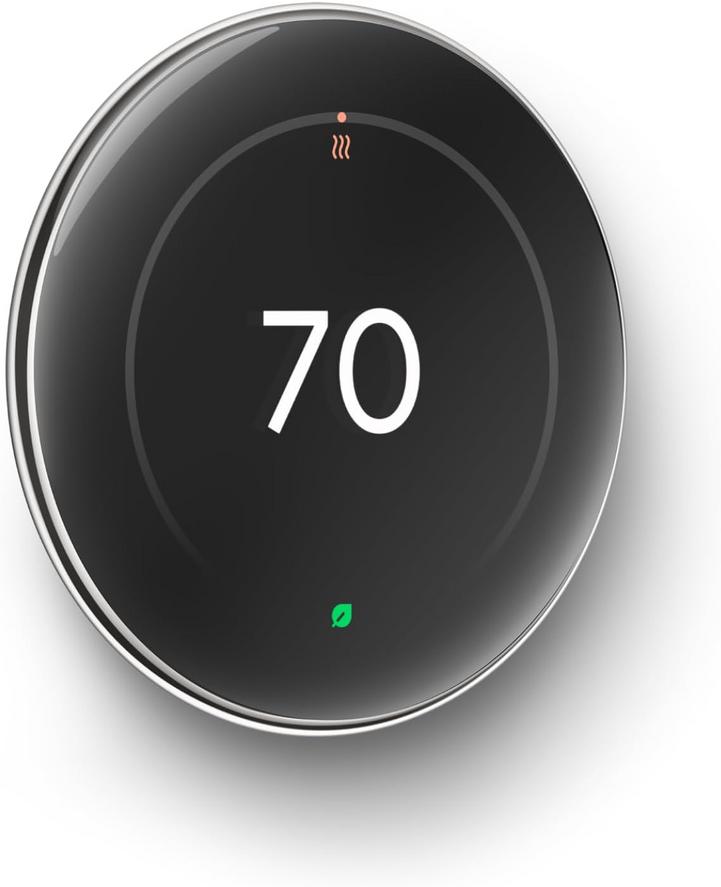
A silver Nest thermostat hangs near the hallway light switch, its circular face a quiet sentinel of home climate. For years, adjusting temperature meant stepping over rugs, twisting a dial, and feeling slight friction in the fingers. Now, tapping an iPhone or glancing at an Apple Watch suffices. It’s a soft shift: the physical act of rising replaced by a notification, and small frictions in daily life smooth into a remote gesture.
Morning routines have folded these alerts into their flow. When the pre-dawn chill lingers, a gentle wrist buzz warns of a dip below a set threshold. Instead of stumbling toward the hallway, fingertips swipe up on the watch face, invoking the Nest app’s glanceable summary. The thermostat’s memory curves around habit: earlier signals morph into a familiar cadence, guiding when to pour coffee or fetch a sweater.
In home offices, the thermostat’s companion sensor sits atop a bookshelf, its presence nearly invisible until temperature readings lag behind the radiator’s hum. Mid-afternoon, a banner appears on the iPhone: the room’s warmth has creeped upward. It prompts a momentary pause from spreadsheets, a glance at the sensor’s icon before returning to work. These interruptions are small—just long enough to register—and they knot themselves into the fabric of a day’s rhythm.
At night, in dim hallways, the ritual flips. Reaching for a wall switch feels antiquated; the hand instead sweeps across a bedside table to fetch an iPhone. Screen glow illuminates the thermostat’s latest heat setting. A final swipe confirms the adjustment before sliding beneath sheets. It is a mundane choreography: a reach, a glance, a tap—yet these low-level gestures underscore how technology slips under the skin of our habits.
Installing the second-generation Nest Temperature Sensor in a quiet guest room introduced another small choreography. I lift the sensor from its box, tapping its battery cover to release a tiny, reassuring click. Slotted onto a shelf, it begins talking to the main unit. Checking the sensor’s battery level via the Home page on my iPad, I find the icon unchanged—another subtle assurance in a system of invisible maintenance.
Recent listings reflect a 14% reduction compared with earlier availability. Conversations in forums now center on how these sensors and thermostats integrate with Apple’s ecosystem, not for novelty but for the delicacy with which they reshape daily life. In each brush of the finger, each wrist motion, lies a map of small adaptations to domestic comfort.
Check current availability here
FAQs
Does the Nest Learning Thermostat work with Apple HomeKit?
It doesn’t offer native HomeKit integration. Control is managed through the Nest or Google Home apps on iPhone, with limited Siri support via third-party bridges.
Can I receive temperature alerts on my Apple Watch?
Yes. The Nest iOS app can send notifications to both iPhone and Apple Watch, mirroring alerts for temperature changes or sensor updates.
How often does the Nest Temperature Sensor’s battery need replacement?
The sensor uses a standard CR2 battery designed to last about a year under normal use, with low-battery warnings sent through the app.
Can I control the thermostat from my iPad?
Yes. Installing the Nest app on an iPad allows full control of temperature settings, schedules, and sensor management from that device.
Verdict
The integration of smart thermostats and temperature sensors into our Apple-centric routines highlights how subtle technology shifts permeate daily life. Notifications on iPhone and Apple Watch transform minor environmental changes into shared moments of attention, replacing physical steps with remote taps. It’s not about grand innovations but about the gentle choreography of comfort—where each glance at a device reaffirms the delicate balance between home and habit.
"Note: Readers like you help support The Apple Tech. We may receive a affiliate commission when you purchase products mentioned on our website."