
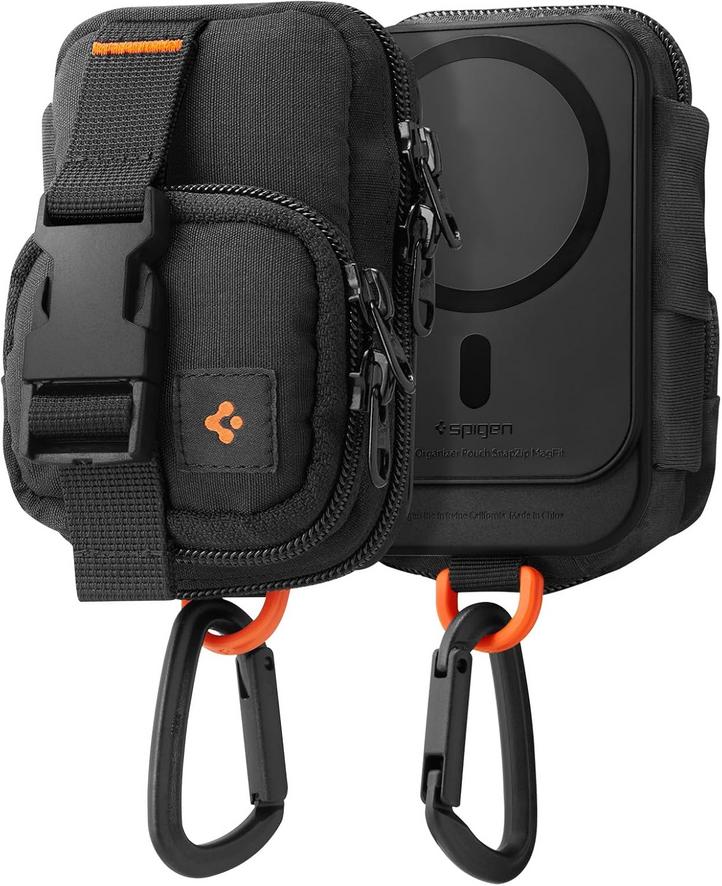
Each morning, the same magnetic pouch clicks softly against a belt loop as an iPhone user secures it before leaving home. Inside, a handful of tiny cables, errant SIM trays and an SSD card rest in velvet-lined snugness. The pouch has slipped into the background of a routine that once depended on pockets and zippered compartments alone—now a nearly invisible addition that quietly reconfigures how essentials stay within reach.
On the desk, it sits beside an Apple Watch charger and an iPad Pro that hums gently. Unzipping the pouch releases a small cascade of connectors onto the work surface. Fingers pause over the keys of a MacBook, then reach for the magnetic pouch, shifting its position to keep adapters aligned for quick swaps. The act of retrieving a cable or card has become a rhythm in itself, neither chore nor delight, but a known beat in the day’s workflow.
In the dim light of a bedside lamp, half-asleep hands fumble for a Lightning cable inside the pouch. The zipper tugs at the fabric lining, a subtle resistance that signals it’s time to ready devices for the next day. Then, in a moment punctuated by a soft metal click, the pouch slides off the belt clip and settles on the nightstand. Its presence is a silent reminder of tomorrow’s to-dos, a nudge toward the necessary rather than the optional.
While riding the subway, the magnetic pouch migrates from belt to backpack strap. A loose gate on the bag shifts it under a strap, and the pouch swings just enough to catch a passing armrest. The slight sway prompts a glance, a flick of the thumb to ensure the SSD card inside remains secure. Such micro-adjustments have emerged as part of the journey: balancing devices, monitoring weight, and weaving small containers into an ever-shifting carry load.
Sometimes the magnet slips—a brief annoyance when the pouch drops onto a café floor amid sips of espresso. Lifting it up, the user notices a scuff and the absence of a connector that bounced free in the fall. This moment highlights the tightrope of magnetic reliance: the comfort of having items at hand, and the friction when that promise falters. Each reattachment is followed by a quick scan of contents, forging a habit of regular inventory.
At the end of the day, the pouch performs one more quiet trick. It affixes to the back of an iPad, mimicking a MagSafe wallet—or attaches to the edge of a MacBook sleeve, becoming an extension of personal storage. Here, the small-square organizer illustrates a broader thread in device rituals. Accessories once considered optional now anchor routines, guiding how cables, cards and curiosities mingle within the Apple ecosystem.
This product is available on Amazon.
Check current availability here
How does the magnetic pouch attach to an iPhone?
The pouch uses embedded magnets aligned with MagSafe standards, allowing it to secure against the back of iPhone models that support the feature.
Can the pouch stay on while wirelessly charging an iPhone?
Magnetic alignment may interfere with wireless charging. It’s advisable to remove the pouch to ensure a stable charging connection.
Will the magnets affect SSD cards or SIM trays inside?
Modern flash memory and SIM cards are not sensitive to these magnets. The pouch’s design keeps contents organized without data interruption.
How does the pouch integrate into backpack or belt workflows?
A clip and reinforced loop let the pouch attach to belts, bag straps or other gear, enabling quick transfer between carry setups.
Verdict
The quiet insertion of a magnetic pouch into daily carry registers as a small but telling shift in pocket management. It underscores how Apple users adapt to magnetic accessories, weaving new dependencies through repeated attachment, detachment and content checks. From midday commutes to nighttime rituals, these low-level habits reveal an evolving choreography between devices, their peripherals and the unseen routines that keep everything within reach.
"Note: Readers like you help support The Apple Tech. We may receive a affiliate commission when you purchase products mentioned on our website."